


Bookings Are Now Open at Just Pole Fitness
Let’s get spinning, stretching, and slaying!
Book your spot today and dance your heart out with us at Just Pole Fitness
How to Book Your Next Class

Step 1: Download the App or visit the Groovio Site
Bookings can be made via the Groovio App, your go-to for seamless scheduling.
Step 2: Search "Just Pole Fitness"
Once in the app, type in Just Pole Fitness and select your studio location

Step 3: Buy Your Credits
Choose your preferred membership or credit pack under the Memberships tab.
Step 4: Double check the location and term before confirming your credit purchase.
Make sure you select the correct Term and Location (e.g., T2Smith for Smithfield, T2Hurst for Hurstville).

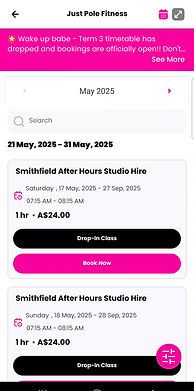
Step 5: Pick Your Class
Browse the Timetable and find a class that fits your energy and schedule.
Step 6: Secure Your Spot
Once you’ve chosen your class, tap to book
and you’re in!
Always check the class availability before purchasing credits.
Download The Groovio App


Discover the Right Class for You


Book/View Our Classes Here
Frequently Asked Questions
How do I get started with booking?
Download the Groovio App, search Just Pole Fitness, buy credits, and book your class!
What’s the difference between memberships and credit packs?
Memberships offer ongoing weekly bookings (great for routine) while credit packs give you flexibility to drop in when you can. Memberships are cheaper per class (Check out the Pricing page for more info)
Can I change or refund my credits?
Credits are non-refundable and non-transferable, so make sure you’ve selected the right term and location before checking out. Memberships can only be cancelled at renewal
Do I have to book each class separately?
Yep! Just make sure you’ve got enough credits, then book away! If you wish to attend the same class each week, you can select recurring booking options for this
What if I have more questions?
Shoot us a message, we’re happy to help you figure out the best option for your pole journey!